Arun Doss's Blog
Finding the Solution and Continued issues
Backstory
I have written my need to create a simple extension in Visual Studio that is needed to open the file from the Solution Explorer in Emacs here. I have gone through the documentation like a mad man every now and then for a week. To add a pointer here I am not a man of documentation myself, as all the coding queries for my level of programming so far were answered with a simple Google Search, with a exemption of my GIS tasks where I deep dive in the documentation. I am not a technical documentation reader guy when it comes to programming. My results always go to this page IDs of Visual Studio Toolbars, I couldn't produce results. I was fed up and about to give up and call it a day as what I want is just a solution for two more clicks. Or else I can always use a separate Command Prompt in another window and open the files. Then I found the success.
The Solution - VisualStudio.Extensibility
It seems like Visual Studio team is also aware of the shortcomings of the .vsct models, they as well switched to the from the older Visual Studio SDK to the new one called VisualStudio.Extensibility in this one all the components are implemented using C# program instead of xaml framed language. This one worked for me and I was able to create my tool.
I used this exact sample called [https://github.com/microsoft/VSExtensibility/tree/main/New_Extensibility_Model/Samples/CommandParentingSample][VSExtensibility/CommandParenting]] from GitHub as the source and I was able to add commands to the context menu(Right Click Menu) of the Solutions and Project files.
Whatever way I tried the same GUID's in the vsct model using the older SDK even though is supported, it never worked for me. Let's say that the implementation is having a bug in the older SDK and call it a day. Let's move on with the new one as it is simple and working.
My Advice
Use the VisutalStudio.Extensiblity SDK from now on wards for extension development. But it is still not completely supported. As per Microsoft statement:
you might encounter situations where the functionality you need in your extension isn't yet available in VisualStudio.Extensibility. In that case, you can use VisualStudio.Extensibility SDK together with Visual Studio SDK running in-process to cover any feature gap.
Also use this GitHub Page, which have list of most of the context and menu locations with GUID's for placement of your Commands and Command Groups for your extensions.
Missing Things
Now the extension is in working state, I have created a command which is hard-coded to open Emacs from my machine and available at right click.
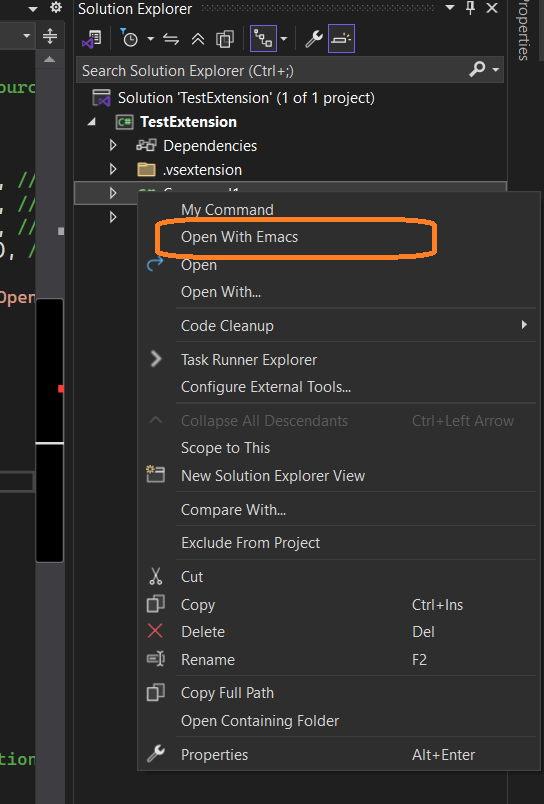
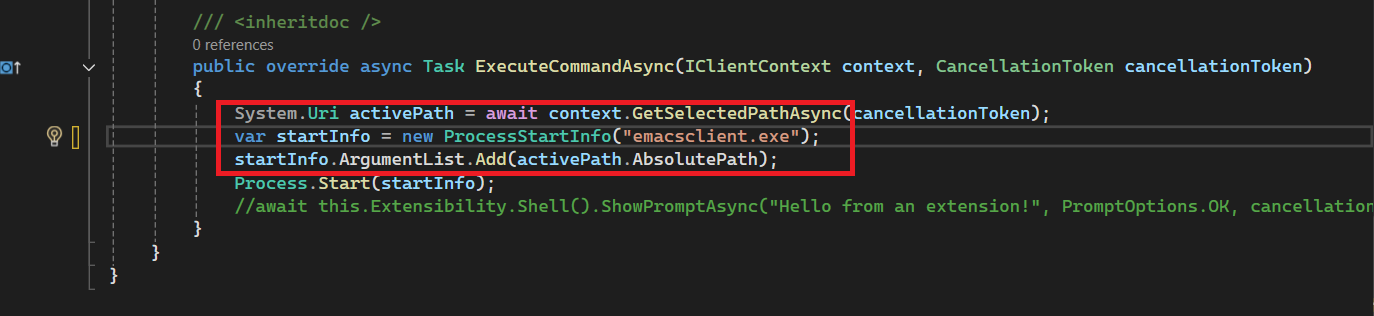
This is working if the project is opened as a Solution or Project, but some of the time I have to open the folder in Visual Studio and edit code as well, like simple Python Script, HTML project or a Angular Project. These cases also I need this command in my arsenal. Which is still not working as Project Items, Solution Items and Folder Items have different context menus and I have not found the exact GUID for that combination yet.
Will update the progress and feature in the next post of this somewhat continued series, at this stage.